N8N + HT801 + VOIP.MS + KASA = Totally Awesome
Hi, its been a little while.. we’ve been helping my daughter (her nickname is Quag 😂 ) and son-in-law moving into a new place. It’s been a fair amount of work. Yesterday we all went to A&W in Steinbach for supper – I’m not really sold on their IOS app. I find the McDonald app to be way better. Plus if you go to A&W (handle and eat a burger) – you smell like a brat for the next 5 hours… 😏😂😂.
The McDonalds app is not perfect in anyway, but they deliver to Blumenort (A&W does not), I get really good deals and apparently my other daughter (her nickname is Keak) told me something about Amazon Prime (the shipping division I think) partnering with Door Dash or something like that. So I’ve got to check that out.
I’ve been working a lot at improving technology solutions, I mentioned in an earlier post about configuring Virtual Faxing between a Ricoh Copier/HT801 ATA and Voip.ms. It works great, however sometimes the subaccount registrations drops – and if does, I don’t know about and therefore I can’t act upon it.
So I had setup each HT801 ATA’s on it’s own KASA plug (mini).. so glory to God – I was nudged into looking at how this could be resolved. The good thing about building solutions is to have a good foundation – just like your spiritual life. So, I use Linode to host N8N (which also handles the voicemail transcription service) and looked into using N8N to connect to the VOIP.MS API (which I had to enable & secure) – I won’t get into those details – the less I say about that, the less hackers can understand what I’ve done exactly.
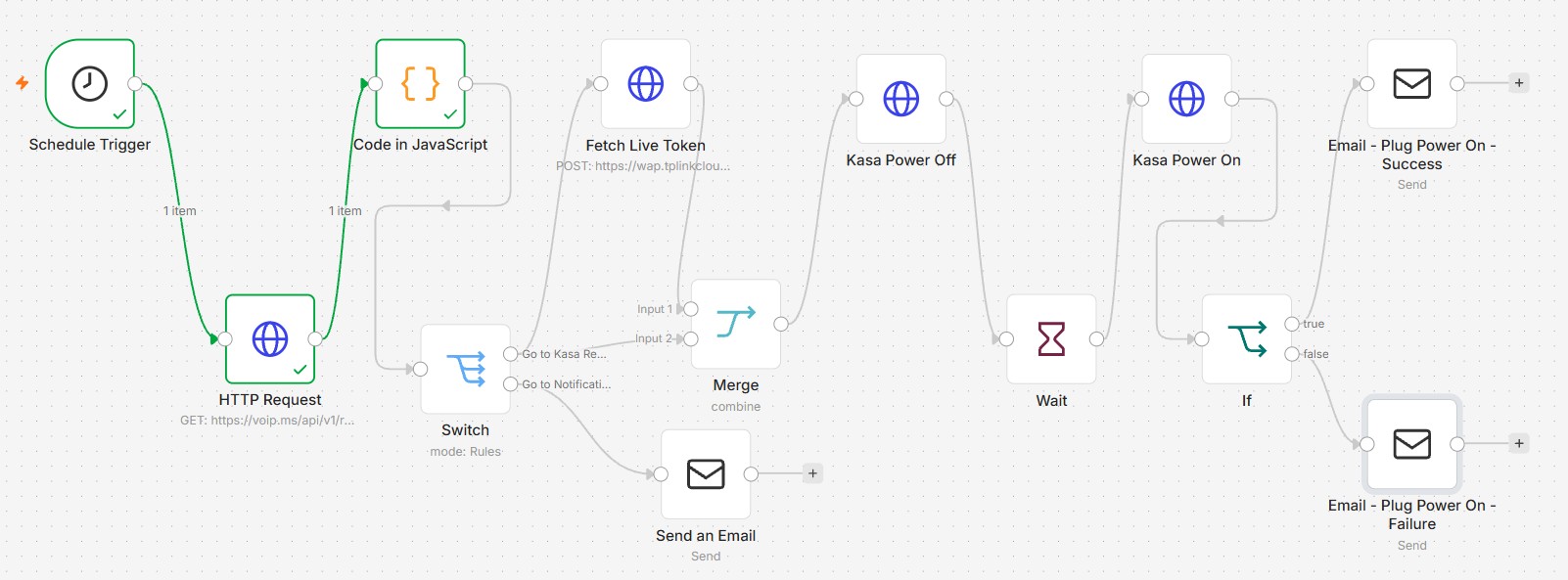
In a nutshell, N8N uses the VOIP.MS api (HTTP Request) and does a get “registration status” on the subaccounts. This status includes info showing what account(s) are currently registered. In the event a registration is missing, the Code Node identifies which subaccount(s) are down (and the KASA Plug and device ID for that plug(s)) and outputs that info to a Switch Node – this is where things start to get more complicated… next if the plug needs to be rebooted, a token is fetched from KASA and passed to the Merge Node which has the token info and the details from the Code Node – this info is merged and outputs to the KASA Power Off Node which powers off the Plug(s) and waits and then powers on the plug(s), emails are sent out at the end of success or failure.
It is a lot to get going for sure, but if you can get all the correct info coming out of the Code node, the rest works off that data. Just like in my other N8N projects, the JavaScript Node does the heavy lifting. The very first Node is the Schedule Trigger which runs every 5 minutes – if all subaccounts are registered (alive), the workflow stops at the Code node.
I wanted to give you some code so you can see how it works inside – I’ve removed some non essential code and redacted our sensitive info. Here is the Code Node
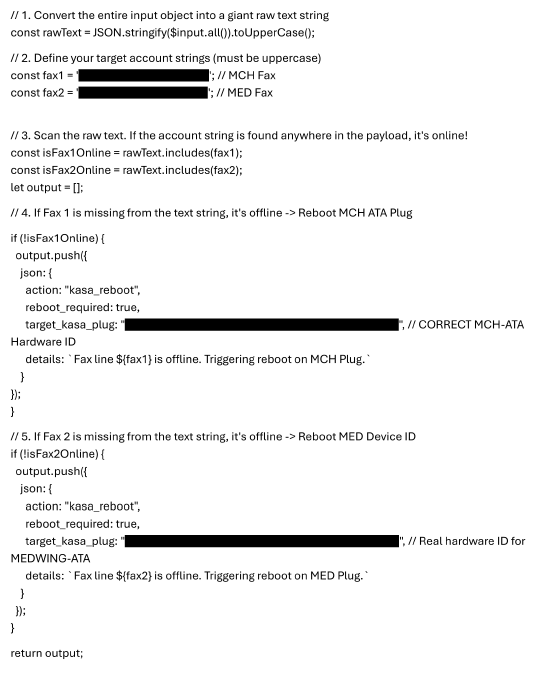
What this all does for us, if it isn’t obvious – in abstracted layman terms, when a fax line “goes dead”, this N8N automation will figure that out and then go and turn off the power to the fax line device, wait, and then turn it back on. This power cycle will cause the fax line to reacquire its registration status and attempt to “go live” and then let me know how it went… this all happens automatically every 5 minutes.
It would be the equivalent of having a human being monitor a website on the off chance that somethings goes wrong and then have them attempt to fix it but for 24 hours a day.
This is not the only project in the last week that we accomplished. I’ve got to say that God helps me with these things – my life rises and falls on his command, I’m so grateful that he is always there for us.
Jason

Related Posts

Hollywood Sucks and why movies are lame these days.
Completely Awesome!!!